
How to Reply to WhatsApp Enquiries Faster Without Hiring More Staff
Most enquiries are lost to slow replies, not price. Measure your reply time, share one inbox, automate the first reply and route genuine leads to a named person.
Most enquiries are not lost because the price was wrong. They are lost because nobody replied while the customer was still interested. Someone sends a WhatsApp message at 8:40 in the evening, the person who usually answers is busy, and by the next morning the customer has already spoken to a competitor.
The usual answer is to hire another person to watch the phone. That helps for a while, but it is expensive, and it does not fix the real problem: the business has no system for who answers, how fast, and what happens next.
This guide shows how to cut your reply time on WhatsApp using the team you already have. It covers what to measure, what to automate, what to keep human, and how to tell whether it is working.
Why reply speed matters more than a perfect reply
When someone sends an enquiry, they are usually asking more than one business at the same time. The first useful reply often sets the direction of the conversation, even if it is short.
This is not a new problem. A Harvard Business Review audit of 2,241 US companies found that only 37% replied to web leads within an hour, 23% never replied at all, and the average response time among those who did reply was 42 hours. Those were web forms rather than WhatsApp chats, but the lesson carries over: most businesses are slower than they think, and slow is the default unless someone designs it otherwise.
On WhatsApp, customers expect faster replies than they do by email, because the channel feels personal. A reply within minutes reads as attentive. A reply the next afternoon reads as a business that is too busy to care.
Measure your current reply time first
Before changing anything, find out where you actually stand. You only need two weeks of honest numbers.
For each new enquiry, record:
- When it arrived (date and time)
- When the first human or useful reply went out
- Who replied
- What happened next: quote sent, visit booked, no response, lost
From this, work out two figures: the median time to first reply during working hours, and the same figure outside working hours. Most owners are surprised by the second number. Evening and weekend messages often wait 12 hours or more, and that is exactly when many customers have time to browse.
If you cannot measure this today because messages are spread across three phones, that is the first problem to fix.
Put every enquiry in one shared inbox
When enquiries arrive on a personal phone, the speed of the reply depends on one person's day. If they are in a meeting, on leave or simply asleep, the message waits.
Moving to a shared WhatsApp inbox, where several team members can see and answer conversations from one business number, changes this immediately. Nobody has to forward screenshots. Everybody can see which chats are new, which are being handled and which are waiting.
Set three simple rules for the shared inbox:
- Every new chat gets an owner within a set time during working hours.
- Nobody replies to a chat someone else owns unless it has been passed over.
- Unanswered chats are visible, so the team lead can see what is waiting at a glance.
These rules matter more than the tool. A shared inbox without ownership just becomes a crowded room where everyone assumes someone else will answer.
Automate the first reply, not the whole conversation
The quickest win is an automatic first message that arrives within seconds. Done well, it buys you time without making the customer feel brushed off.
A useful first reply does three things: it confirms the message arrived, it sets a realistic expectation, and it starts collecting the details you will need anyway. For example:
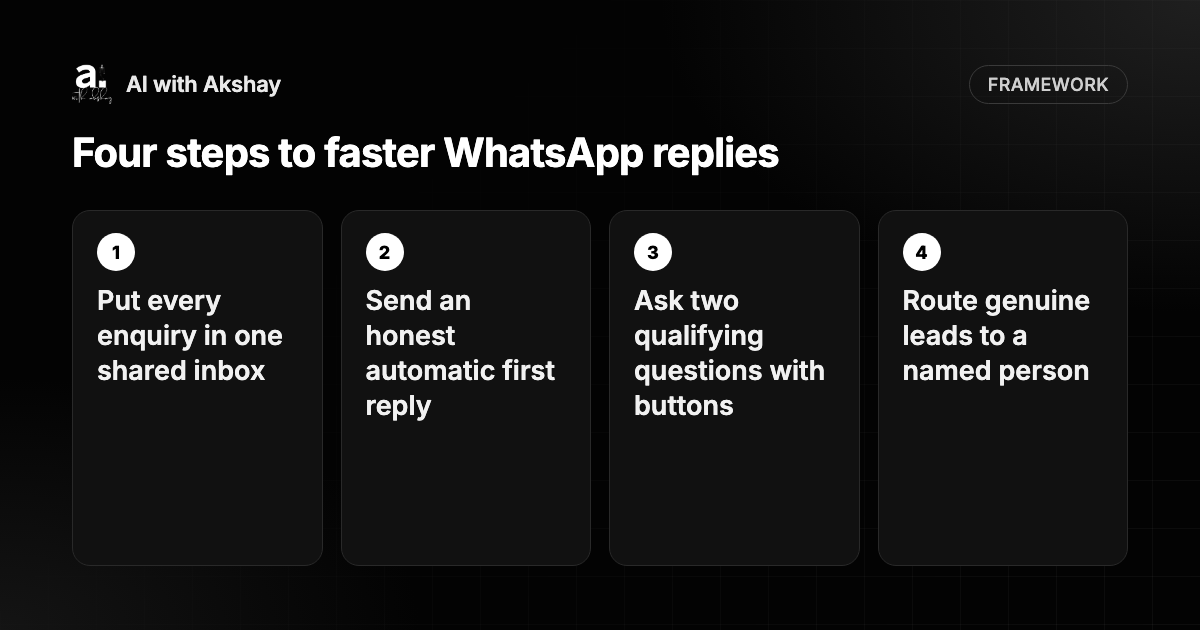
Hi, thanks for messaging us. One of our team will reply personally within 30 minutes during working hours (9am to 7pm). To help us answer faster, could you tell us what you are looking for and your location?
Keep the promise honest. If you write "within 30 minutes", the team has to actually meet it. An automatic message that promises speed and is followed by silence is worse than no automatic message at all.
Outside working hours, change the wording so the customer knows when to expect a reply, and offer a way to book a call or see prices in the meantime.
Ask two qualifying questions inside the chat
A large share of reply time is spent on back-and-forth that could have been handled in one step. Someone asks "what is the price?", the team asks "for which service?", the customer replies two hours later, and the cycle repeats.
Instead, let the automation ask the two or three questions that every enquiry needs. For most service businesses, these are:
- What do you need? (offered as buttons where possible, such as "New project", "Pricing", "Support")
- When do you need it? ("This month", "In 1-2 months", "Just exploring")
Buttons work better than open questions because customers can answer with a single tap. When the human picks up the chat, they already know whether this is an urgent buyer or someone researching, and can reply with something specific rather than another question.
This is the point where a WhatsApp automation tool earns its place. Platforms built for this, such as SynxZap, which is designed to bring down WhatsApp reply times, let you set up the welcome message, the buttons and the routing without writing code. Whatever you use, keep the questions short. Three is usually the limit before people drop off.
Route genuine leads to a named person
Once the answers are in, route the chat. A simple rule is often enough:
| Answer | What happens |
|---|---|
| Needs it this month | Assigned to a senior salesperson, alert sent immediately |
| Needs it in 1-2 months | Assigned to the general queue, reply within the promised time |
| Just exploring | Sent useful information (price guide, portfolio), follow-up in a week |
| Existing customer, support | Sent to the support owner, not the sales queue |
The aim is not to ignore anyone. It is to make sure the people most likely to buy soon never wait behind people who are browsing.
Write the routing rules down and review them monthly. If "just exploring" customers keep turning into buyers, move them up the queue.
Know the 24-hour window and plan follow-ups
If you use the WhatsApp Business Platform (the API version used by most automation tools), there is a rule worth knowing. Meta's pricing documentation describes a 24-hour customer service window that starts when a customer messages or calls you, and resets each time they message again.
In practice, this means fast replies are not just good manners. Replying and following up while that window is open keeps the conversation simple. Leaving a chat for days means any later follow-up has to go through the more formal message templates.
So build the follow-up into the system rather than relying on memory. If a customer received a quote and went quiet, a polite check-in the next day is reasonable. If they said "just exploring", a single useful message a week later is better than three reminders. Our guide to building a customer follow-up system around ownership and next actions covers how to set stop rules so follow-ups stay helpful rather than pushy.
Make sure your marketing and your inbox are connected
Many businesses spend money on ads that send people to WhatsApp, then lose those same people in a slow inbox. The ad report shows plenty of leads; the sales team says the leads are poor. Often the leads were fine and the reply was late.
If you run ads or rely on your Google Business Profile for enquiries, look at reply time for those leads separately. A team that manages both sides, such as FYBB 360's performance marketing service, can tie ad spend to what happens in the chat, which is where the money is actually won or lost.
Common questions
Will customers be annoyed by an automatic reply?
Not if it is short, honest and useful. People are annoyed by automation that pretends to be a person or traps them in a loop. Make it clear a human will follow up, give them an easy way to reach one, and keep the questions to two or three.
Can we do this with the free WhatsApp Business app?
Partly. The free app has greeting and away messages and quick replies, which help a small team. Once several people need to answer from one number, or you want buttons, routing and reporting, you will usually need a tool built on the WhatsApp Business Platform.
What is a good reply time to aim for?
Start from your own measurement and set a target you can meet every day, such as 15 or 30 minutes during working hours. Then add a clear expectation for evenings and weekends. A consistent promise you keep is better than an ambitious one you miss.
Start with one week of measurement
You do not need to change everything at once. Measure your real reply time for a week, set up a shared inbox with clear ownership, and add an honest first reply with two qualifying questions. Most teams see the difference within the first month, without adding anyone to the payroll.
If you would like help designing the whole system, from the first message to routing, follow-up and reporting, work with Akshay on your customer communication system.